

Showing posts with label Bookmarks. Show all posts
Showing posts with label Bookmarks. Show all posts
Sunday, February 16, 2014
Meetup, a Popular Online Social Networking Portal

Wednesday, January 22, 2014
A Website to Create a Favicon
When visiting a website, you can see its favicon like this below.

A favicon known as a shortcut icon, website icon, or bookmark icon is a mixed word using favorites and icon. Most of websites use the favicon. The reason is that the favicon makes the websites stand out and distinguish from other websites.
Even if you make an image for the favicon in photshop, you need a converter to change the
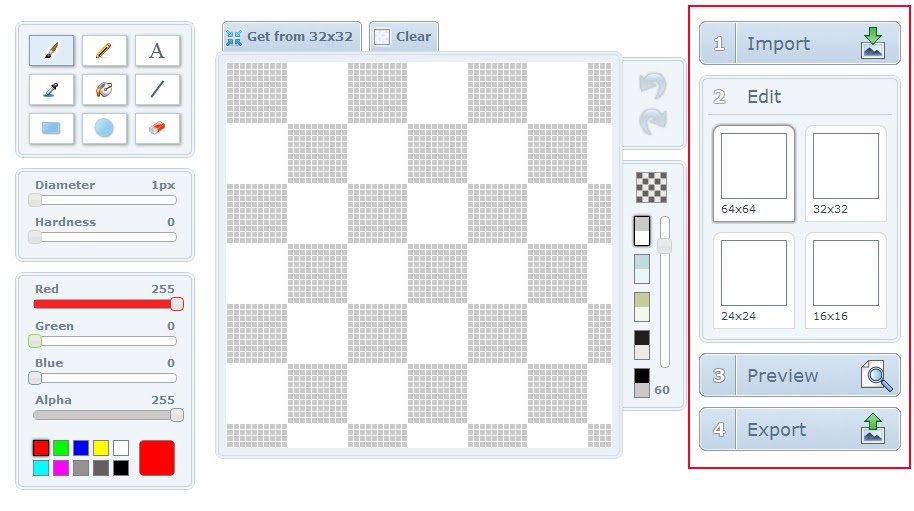
favicon file, favicon.ico. There is some software, but you can do that through a website without downloading software. You can just import and export your file from the website. I'll let you know one of websites for the favicon. Here it is: http://www.xiconeditor.com.
Most size of the favicon is 16 x 16 pixels, but you can make a
bigger size at first. After then, when exporting a file, you select the size you
want here. If you use this website, you can easily create your favicon. You just follow the step like this below.
Thursday, January 9, 2014
Shazam - an Awesome Music Recognition Application

If you have never used Shazam, I recommend you use it. I believe that you will love it. I'm going to link to the website of Shazam here: http://www.shazam.com.
Tuesday, January 7, 2014
How to Use Adobe Creative Cloud and CS6
The latest version of Adobe is Creative Cloud. If you visit this website, you can watch more video lectures of Adobe Creative Cloud and CS6: http://tv.adobe.com/channel/how-to/how-to-cs6-tutorials.


Monday, January 6, 2014
How to Use Adobe Dreamweaver CS6
If you want to know how to use Adobe Dreamweaver CS6, I'm going to link to the website. Here is the video lecture of Adobe Dreamweaver CS6: http://tv.adobe.com/show/learn-dreamweaver-cs6.


Sunday, January 5, 2014
How to Use Adobe After Effects CS6
If you want to make your videos look more attractive, you should learn Adobe After Effects. Here is the video lecture of Adobe After Effects CS6: http://tv.adobe.com/show/learn-after-effects-cs6.


Saturday, January 4, 2014
How to Use Adobe Premiere Pro CS6
Many users upload their videos online, using various video editing programs. Among them, if you want to know how to use Adobe Premiere Pro CS6, I'm going to link to the website. Here is the video lecture of Adobe Premiere Pro CS6: http://tv.adobe.com/show/learn-premiere-pro-cs6.


Friday, January 3, 2014
How to Use Adobe InDesign CS6
To learn InDesign is easy and simple. If you know how to use Microsoft Office Word, you can simply understand InDesign. Here is the video lecture of Adobe InDesign CS6: http://tv.adobe.com/show/learn-indesign-cs6/%7B%7B.


Thursday, January 2, 2014
How to Use Adobe Illustrator CS6
Last time, I posted the video lecture of Adobe Photoshop CS6. This time, I'm going to post the video lecture of Adobe Illustrator CS6. I will link to the website. Here is it: http://tv.adobe.com/show/learn-illustrator-cs6.


Thursday, November 14, 2013
Diary of a Wimpy Kid - Funny Book

Searching something on Google, I accidentally started to read “Diary
of a Wimpy Kid” by Jeff Kinney a few days ago. The book has been published in a serial form. It is a popular fiction book for children.
It is so funny that I cannot stop reading it. Reading the book, I’m giggling alone even though I’m an adult. :) If somebody looks at me giggling, he or she might feel that I'm like a silly person. If you read it, you may be the same as me. :)
It is so funny that I cannot stop reading it. Reading the book, I’m giggling alone even though I’m an adult. :) If somebody looks at me giggling, he or she might feel that I'm like a silly person. If you read it, you may be the same as me. :)
I have been reading its first book on this website: http://www.funbrain.com/journal/Journal.html?ThisJournalDay=1&ThisPage=1.
The website is that I visited by accident and then that I started to read “Diary
of a Wimpy kid”.
Reading this book, I wondered how many volumes it has completed, so I visited
Amazon.com. I figured out that its eighth book came out last week and becomes #1
bestseller on Amazon.com.
After book 1, I’d
like to read until the latest book 8 as soon as possible.
Friday, October 25, 2013
Indeed.com for Jobs

Life expectancy is getting higher. We will live to 100 years. Nevertheless, due to global
economic crisis, unemployment rate is still high; many young people can’t find
a job right away after graduation. Some of them want to establish a business
with a little capital instead of getting a job. The others find a job.
There are a lot of job-searching websites. Among them, I recommend Indeed.com, a great job search
engine: http://www.indeed.com. Indeed offers
all jobs by searching from job sites, newspapers, associations and company
career pages. Therefore, you don’t need
to visit every single job website. The site is really helpful in finding a job
you want. If you are looking for a job, use Indeed.com. Good Luck!
Thursday, October 24, 2013
Kayak.com for Travel

Travel for me is happiness. I have traveled over 20 countries so far; among them, I can't count how many cities I have traveled. Through travel, what I can learn about the different cultures and manners of other countries is pleasant and grateful.
When planning to travel these days, I use kayak.com, a price comparison website: http://www.kayak.com. Maybe many people use this site. The site offers
travelers to be useful and convenient. If you don’t know the site, I’d like to
recommend it to you.
Friday, September 27, 2013
How to use Adobe Photoshop CS6
Many people take a picture and then edit it by Photoshop. If
you have a blog, Photoshop is also useful for making your blog. If you don’t know
how to use Photoshop, you can learn from this website: http://tv.adobe.com/show/learn-photoshop-cs6.
Here is a video lecture.


Monday, June 24, 2013
Free Blogger Templates for Your Blog
If you are a blogger, maybe you want to have your representative template to distinguish from others' blog. Google blogger offers limited templates. If you choose one of them, you have the same design like others.

Many users share their template on the Internet. I would like to introduce one of free template websites. Here is a website below.
http://btemplates.com : this site offers various templates. Before you download a template, you can see a demo version of it. If you like the template you see, download. It is free.
http://btemplates.com : this site offers various templates. Before you download a template, you can see a demo version of it. If you like the template you see, download. It is free.

Wednesday, June 19, 2013
The App of Tunein Radio: Let's Listen to Free Online Radio

I have installed a lot of applications on my smart phone,
but I don’t use all of them every day. I only use several apps per day. One of them is
Tunein Radio. It offers all genres of music, news, sports, talk shows, and comedy. Wherever connecting to the Internet, I can use Tunein Radio. This app is so useful that I
listen to the live radio every day.
If you have never used Tunein Radio yet, search it on Play Store or on App Store and then install. If you don’t have a smart phone, you can also
use the website of Tunein Radio and choose one of radio stations: http://tunein.com Furthermore, if you want to improve English listening skills, it will help you to do so; you can listen to the world's radio.
Using many apps, I think that apps used every day have competitiveness
and win users heart. Thanks to this,
maybe Tunein Radio has been loved so far.
Tuesday, June 18, 2013
ADP Payroll Calculator for Net Pay

Many workers wait for their payday. If you are a new employee, maybe you wonder how much you can take home pay from your gross annual income. If you don't know how to calculate net pay, use ADP(Automatic Data Processing) payroll calculator. You can estimate the net pay from the calculator.
Here is a website for it: http://www.adp.com/tools-and-resources/calculators-and-tools/payroll-calculators/salary-paycheck-calculator.aspx
Sunday, June 16, 2013
How to Calculate Electricity Usage

I had never cared about how to calculate electricity usage. One day, after getting my electricity bill, I was so surprised that I couldn't believe my eyes; it was too high.
Maybe some people have had such an experience like me. If you understand a way to calculate the usage, you can efficiently use electricity and reduce electricity usage.
Here is a way to calculate electric power in watts.
- Check out the home appliances you have.
- Pay attention to the yellow EnergyGuide label; you can see rated power.
- Write down the rated power and make a list.
- Multiply the rated power, hours daily using, and
30 days, and you will get monthly electricity usage. For example, if an home appliance
has a wattage of 1200 and you use 1 hour every day, the way to calculate is to be 1200 X 1 X 30 = 36kWh.
If you see amperes of an appliance instead of wattage, convert amps to watts. Here is a formula for it: Watts = Volts x Amps
I link a website for a free electricity usage calculator: http://www.electricity-usage.com/Electricity-Usage-Calculator.aspx
Subscribe to:
Posts (Atom)